Image Prompt

Portrait direction

Create the best prompt for ai image generator for men

The best prompt for ai image generator for men gives the model more than a subject. It sets identity, mood, styling, composition, lighting, and context so the result feels intentional rather than generic.

Describe the look you want
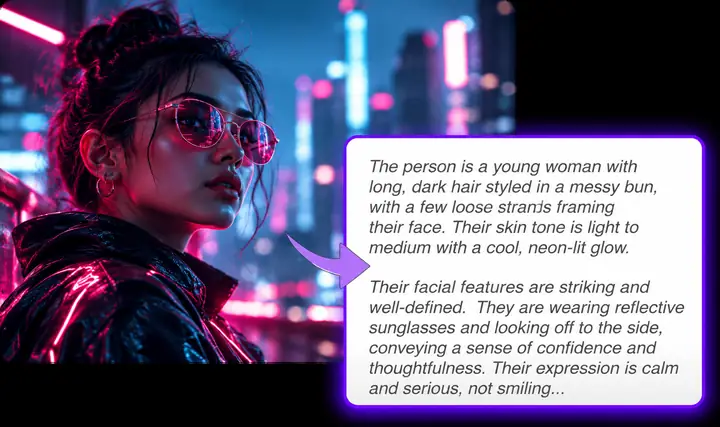
A vividly lit portrait paired with a detailed image prompt

Related paths

the audience's existing pipeline

Men's portrait work usually starts with a rough brief, a reference image, or a channel-specific idea. These related routes help turn that starting point into a usable visual direction.

Honest boundaries

where we slot in

An image prompt generator can organize visual intent, but it cannot replace taste, references, or a final review of the generated image.

It cannot guarantee a specific face

A text description may suggest age, hair, expression, and styling, but identity and facial details can vary between generations.

Workaround

Add a clear reference image when the workflow supports one, then review several outputs instead of expecting one exact likeness.
It cannot infer your brand automatically

Words such as modern or premium are open to interpretation and may produce inconsistent visual language.

Workaround

Name the wardrobe, palette, setting, audience, and emotional tone your brand already uses.

It cannot fix weak source direction

A vague request for a man in a nice outfit leaves too many choices open for the image model.

Workaround

Specify the subject, action, location, camera feel, lighting, composition, and intended use.

It cannot verify sensitive representation

Generated people can include unintended stereotypes, awkward anatomy, or culturally inaccurate details.

Workaround

Review every result for dignity, context, consent, and whether the image matches the people it is meant to represent.

Simple workflow

Turn a rough brief into a usable visual direction

The workflow keeps the image prompt generator focused on decisions that matter for male portraits and lifestyle scenes.

  1. 1

    Name the subject

    Describe the man's approximate age, appearance, clothing, posture, expression, and role without relying on vague labels.

  2. 2

    Set the visual context

    Add the setting, time of day, lighting, camera perspective, color treatment, and mood that support the intended message.

  3. 3

    Review and refine

    Check the generated prompt for stereotypes, missing details, and unnecessary adjectives before sending it into your image workflow.

Prompt anatomy

before/after

A side-by-side brief shows why a detailed image prompt generator input is more useful than a subject-only request.

Loose request
Directed request

Subject

Loose request

A man

Directed request

A confident man in his early thirties

Wardrobe

Loose request

Nice clothes

Directed request

Tailored charcoal jacket over a plain cream shirt

Expression

Loose request

Good-looking

Directed request

Calm, approachable expression with a natural gaze

Setting

Loose request

A city

Directed request

Quiet modern street outside a glass office building

Lighting

Loose request

Professional lighting

Directed request

Soft late-afternoon window light with gentle edge highlights

Composition

Loose request

Portrait

Directed request

Chest-up editorial portrait with space on the left for copy

Visual finish

Loose request

Realistic

Directed request

Natural skin texture, restrained contrast, polished magazine style

A short image idea beside a fuller visual brief Before: subject only
A vivid male portrait paired with a detailed prompt After: directed portrait brief
Specific choices give the image model more useful direction without forcing one exact result.

Practical applications

deliverable spec

The same image prompt generator can support different male-focused briefs when the audience, channel, and intended outcome are explicit.

Professional profile creator

You need a credible portrait for a profile, author page, portfolio, or speaker bio.

The prompt prioritizes approachable expression, clean styling, balanced light, and enough negative space for the layout.

prompt for ai image generator for social media

Men's fashion marketer

You are planning a campaign concept around tailoring, streetwear, grooming, or seasonal clothing.

The image prompt generator turns the styling brief into a scene with deliberate wardrobe, pose, lighting, and editorial composition.

ai image prompt examples

Fitness or wellness brand

You want an active male subject presented as capable, energetic, and believable rather than exaggerated.

The prompt can define movement, environment, body language, atmosphere, and a respectful representation of the subject.

best ai prompts for images

Writer or storyboard artist

A character description needs to become a visual reference for a scene, pitch, or creative treatment.

The prompt connects character traits with location, period, action, framing, and the emotional beat of the scene.

how to write prompt for ai image generator

Give your next male-focused image a clearer brief

Start with the person, then add the choices that make the image useful: wardrobe, expression, setting, light, composition, and audience. The image prompt generator can help turn that direction into a prompt you can refine and use.

Generate a prompt
  • Describe the intended subject and mood
  • Add visual details instead of generic praise
  • Review the result before using it in a campaign

Scenario FAQ

scenario FAQ

Answers to common questions about creating stronger prompts for male portraits and related image concepts.

A strong prompt combines the subject with specific direction for clothing, expression, setting, lighting, composition, and mood. It avoids relying on broad labels such as attractive or masculine without explaining the visual qualities you want.

Describe only the traits that matter to the image: approximate age, hairstyle, wardrobe, posture, expression, role, and environment. Add camera or lighting direction when the framing and visual finish are important to the result.

It can help structure a headshot brief with a suitable expression, wardrobe, background, light, and composition. The generated image still needs review because facial identity, anatomy, and small details can vary.

Use concrete context instead of assumptions about strength, personality, occupation, or appearance. Describe the subject as an individual with a specific setting, action, expression, and purpose, then check the output for unintended clichés.

Yes, when those details affect the message or composition. Clothing establishes role and style, while lighting changes mood, texture, and perceived professionalism; both help an image prompt generator produce a more directed brief.

Start creating
Start creating